Showing posts with label Norton Security with Backup. Show all posts

4/20/2016

The New Norton Security 2017 Beta is Here!


Symantec has released the beta version of Norton Security 2017 for Windows 10, Windows 8.1, Windows 8, Windows 7, Windows Vista Service Pack 1 or later and Windows XP Service Pack 3

To install your Norton Security 2017 BETA: Visit: https://manage.norton.com/beta?page=register and enter your email address, your installation of the beta test version of Norton Security 2017 should have started automatically.
If it did not, follow the directions below:
1. Save the file 'NSBUBetaDownloader.exe' to your desktop, double-click it to download the product and start the installation.
2.If the email address you're using is not registered to a Norton Account, you will have to click on 'Create a Norton Account’ when prompted to Sign In.
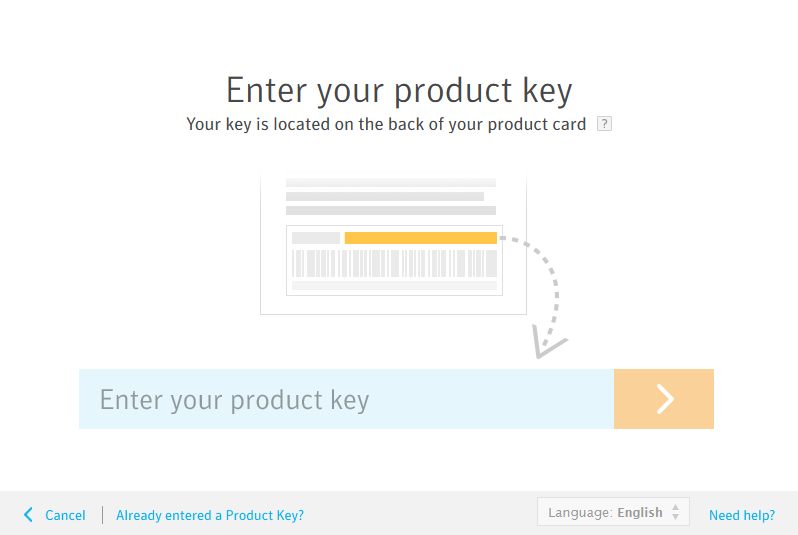
3.Copy and paste or retype your Product Key to activate your Norton Security 2017software.

Protect it all with the best of Norton. Get Norton Security today.  
http://www.anti-virus4u.com/Norton-Security-s/51.htm

What's new in Norton Security 2017?

Sandboxing, or isolating potential threats - Cybercriminals attempt to trick security solutions by “packing-up” malware (often-times within legitimate software files) to prevent it from being identified. Norton is extremely proud to announce a new high-performance emulator that uses these cybercriminals' tricks against them. Norton Security will run and analyze unknown and suspicious files in an isolated protected virtual environment to see how they act before allowing the file to be run on the user's device. This helps to ensure the file is safe before it takes up residence and wreaks havoc on a user's device. 

IPS support for https - Norton Security's Intrusion Prevention System (IPS) blocks threats originating from your network, before those threats take up residence on a device. To help protect customer's data, financial institutions and other organizations that deal with your personal information use https - the encrypted version of http. Unfortunately, suspect sites have followed suit and are using https as well. The IPS included in Norton Security now detects attacks using https connections, and stops those attacks before they take up residence on the device. 

Proactive exploit protection (PEP) - Holes and backdoors in your operating system and other software that you've installed are exploited by cybercriminals to inject malware onto your device without your knowledge. These vulnerabilities often take weeks to months for the original software vendors to patch, leaving your system exposed to malware in the interim. PEP improves your device security, your privacy and your critical personal information by blocking the malware attempting to exploit these holes and backdoors. PEP is not dependent on signatures or prior knowledge of exploits, and is therefore able to address vulnerabilities from the day they exist.

64-bit browser support - Web browsers are a major entry point to the Internet for most users today. Malware writers continue to attack users through malware-infected websites designed to silently slip past the web browser (and device). Fraudulent websites attempt to trick users into providing personal and financial information. Norton Security now works within the 64-bit versions of Microsoft Internet Explorer and Mozilla Firefox. 

To receive updates when a new build is available, please follow our Norton Public Beta Twitter Account at http://www.twitter.com/norton_beta.

If you have questions concerning this beta, please click here or copy the following URL into your browser: https://community.norton.com/en/forums/Norton_Security_Public_Beta


9/21/2015

Norton Security Products Launch Updates


Symantec will launch new version (Rehash) of Norton Security (Cloud-Based Antivirus) on October 5
“We at Norton are constantly striving to provide the most comprehensive and responsive set of products for our customers. To that end, we are proud to announce a revitalization of our main Norton product line. See below for our current products and what their new names in English speaking markets will be after this launch.” 

• Norton Security Standard (formerly Norton Security for 1 Device) 
• Norton Security Deluxe (formerly Norton Security) 
• Norton Security Premium (formerly Norton Security with Backup) 

*The projected launch dates are October 5th in the US, Canada, all Latin American countries. October 19th in Australia/New Zealand, and rest of the globe.
http://www.anti-virus4u.com/Norton-Security-s/51.htm

4/12/2015

Download, Install and Activate your Norton Security Product

How to download, install and activate your Norton Security product?

We have chosen Norton Security, but you can follow the same steps to download, install and activate your Norton Security with Backup.

  1. Visit https://manage.norton.com/setup to create an account / sign in to enter your product key, access your account, manage your subscription, download, install and activate your Norton Security product. 
  2. Type your Norton Security product key and click the arrow icon.
     
  3. Click Agree & Download to download your Norton Security product via Norton download manager.
     
  4. Click the Norton downloader file.
     
  5. The system will find automatically, correct version of Norton Security that is compatible with your device.
     
  6. Click Agree & Install to install your Norton product. 
  7. Your Norton Security product will be automatically activated, and registered to your Norton account.
Congratulations! 
You have successfully download, install and activate your Norton Security product

Follow the same instructions to install all Norton Security products on your device.
http://www.anti-virus4u.com/Norton-Security-s/51.htm


Norton Security 2016 Products called Norton Security Version 23


The next version of Norton Security 2016 products called Norton Security Version 23

Norton Security 2016 (V23)
Norton Security with Backup 2016 (V23)

Starting with 2015 release, Norton products are called Norton Security. Norton Antivirus and Internet Security changed to Norton Security and Norton 360 changed to Norton Security with Backup. In addition the version in the name is gone.

This allows to perpetually releasing versions of the products without having to do GUI (Graphical user interface) changes in the products.

NOTE: Symantec provides a free upgrade to any new version of Norton Security or Norton Security with Backup. If you are using old Norton Security product you can upgrade, free of charge to the new version of Norton Security or Norton Security with Backup as long as your software license key is valid.

In order to find the version of your Norton product:
1. Start your Norton product. 
2. On top-right corner, click Help & Support or Support > About 

For example: 
23.x.x.x: 2016 (Next version) 
22.x.x.x: 2015 (Current version) 
21.x.x.x: 2014 
20.x.x.x: 2013 
19.x.x.x: 2012 
18.x.x.x: 2011 
http://www.anti-virus4u.com/Norton-Security-s/51.htm