Showing posts with label Norton Security with Backup 2016. Show all posts

10/09/2015

Norton Security 2016 - What's new?

 Symantec has launched the new edition of the Norton Security products line. Norton Security 2016 is the best of Norton and specifically designed to protect all your devices, from 1 device for personal use up to 10 devices for all household. 

Meet the New Norton Security 2016 products Line
Norton Security Standard 2016 (formerly Norton Security for 1 Device) - With Norton Security standard, protect your favorite device (Windows PC or MAC). 
Norton Security Deluxe 2016 (formerly Norton Security) - With Norton Security Deluxe you get to mix and match of protection on up to 3 or 5 devices. 
Norton Security Premium 2016 (formerly Norton Security with Backup) With Norton Security Premium you can protect a family of up to 10 devices and backup your personal information on your PC to a secure cloud. 

With patented technology that's always on, Norton 2016 providing security that's custom-built for each device whether it's safeguarding all of your personal information on your smart phones and tablets in case they're lost or stolen, or protecting your laptops and desktops from online threats or identity theft. 

Protect it all with the best of Norton. Get Norton Security 2016 today.  

4/16/2015

Norton Security 2016 Beta (Windows 10) Download Links

Symantec has released the public beta of Norton Security 2016 and Norton Security with Backup 2016. The New version exclusively designed for Windows 10.

Welcome to Norton Security 2016 and Norton Security with Backup 2016


NOTE: You shouldn't use the Beta version of Norton Security 2016 as your main security protection

Norton Security 2016 - Supported Operating Systems 
  • Microsoft® Windows® XP (32-bit) Home/Professional/Tablet PC/Media Center (32-bit) with Service Pack 3 (SP 3) or later 
  • Microsoft Windows Vista® (32-bit and 64-bit) Starter/Home Basic/Home Premium/Business/Ultimate with Service Pack 1 (SP 1) or later 
  • Microsoft Windows 7 (32-bit and 64-bit) Starter/Home Basic/Home Premium/Business/Ultimate with Service Pack 1 (SP 1) or later 
  • Microsoft Windows 8/8 Pro (32-bit and 64-bit) o Microsoft Windows 8.1/8.1 Pro (32-bit and 64-bit) 

Norton Security 2016 Beta Download Link

Norton Security with Backup 2016 Beta Download Link

Click Here to Save 40% on The NEW Norton Security

Norton 2016 Beta Known Issues:
  • UPGRADE - When the 22.5 (2016) beta layout is installed over 22.x (2015) builds, upgrade error occurs - however, product is functional with the second reboot 
  • MAIN UI - Backup widget is shown in NS BETA layout, but it takes the customer to the NOBU beta portal 
  • BACKUP - The blue overlay icons are not displayed in Windows 10 OS 
  • BACKUP - Backed up Optical drive is missing in N-Drive in Windows 10 OS 
  • BACKUP - Throttle States are not changing when Bandwidth Throttle is moved 
  • CUSTOM SCAN - Scheduled Full System Scan becomes disabled when changes are made to Settings 
  • CUSTOM SCAN - Pausing a custom scan, doesn't actually pause the scan 
  • THREAT REMEDIATION - After turning on Auto-protect, live threat gets remediated without user consent 
  • DETECTION TOASTERS - 'View details' is cut off or missing on AP toasters (pop-up windows) 10.IDENTITY SAFE - In Google Chrome, the antiphishing blocking may not work on first visit to the page; however, it blocks correctly on non-Chrome and revisits to the page 
  • IDENTITY SAFE - On Windows 10 OS & IE not the default browser, launching logins from vault UI, always opens IE instead of using user's default browser 
You have to Download, Install and Activate your Norton Security 2016 Beta, for more information visit: http://us.norton.com/beta/overview/ns2016-beta
http://www.anti-virus4u.com/Norton-Security-s/51.htm
 

4/12/2015

Download, Install and Activate your Norton Security Product

How to download, install and activate your Norton Security product?

We have chosen Norton Security, but you can follow the same steps to download, install and activate your Norton Security with Backup.

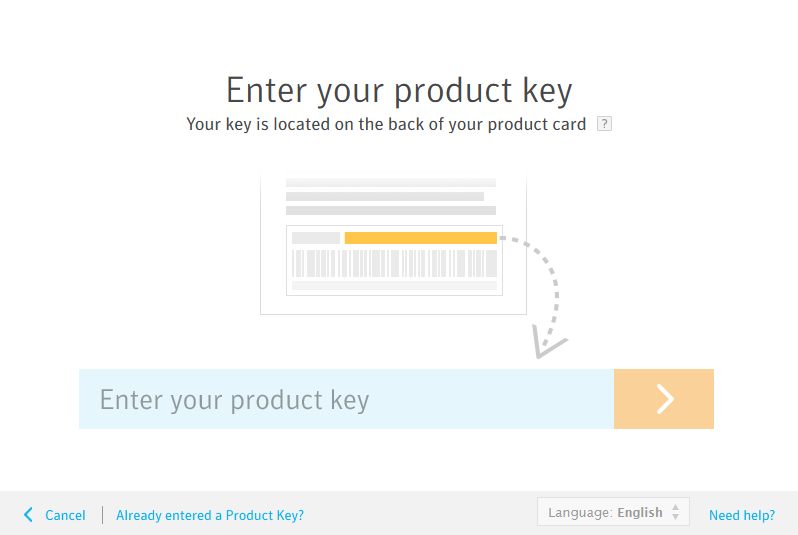
  1. Visit https://manage.norton.com/setup to create an account / sign in to enter your product key, access your account, manage your subscription, download, install and activate your Norton Security product. 
  2. Type your Norton Security product key and click the arrow icon.
     
  3. Click Agree & Download to download your Norton Security product via Norton download manager.
     
  4. Click the Norton downloader file.
     
  5. The system will find automatically, correct version of Norton Security that is compatible with your device.
     
  6. Click Agree & Install to install your Norton product. 
  7. Your Norton Security product will be automatically activated, and registered to your Norton account.
Congratulations! 
You have successfully download, install and activate your Norton Security product

Follow the same instructions to install all Norton Security products on your device.
http://www.anti-virus4u.com/Norton-Security-s/51.htm


Norton Security 2016 Products called Norton Security Version 23


The next version of Norton Security 2016 products called Norton Security Version 23

Norton Security 2016 (V23)
Norton Security with Backup 2016 (V23)

Starting with 2015 release, Norton products are called Norton Security. Norton Antivirus and Internet Security changed to Norton Security and Norton 360 changed to Norton Security with Backup. In addition the version in the name is gone.

This allows to perpetually releasing versions of the products without having to do GUI (Graphical user interface) changes in the products.

NOTE: Symantec provides a free upgrade to any new version of Norton Security or Norton Security with Backup. If you are using old Norton Security product you can upgrade, free of charge to the new version of Norton Security or Norton Security with Backup as long as your software license key is valid.

In order to find the version of your Norton product:
1. Start your Norton product. 
2. On top-right corner, click Help & Support or Support > About 

For example: 
23.x.x.x: 2016 (Next version) 
22.x.x.x: 2015 (Current version) 
21.x.x.x: 2014 
20.x.x.x: 2013 
19.x.x.x: 2012 
18.x.x.x: 2011 
http://www.anti-virus4u.com/Norton-Security-s/51.htm